
SMS terms and consent
Kautio is a personal safety check-in service operated by Hearthmates Inc.. This page describes every text message the Kautio service may send, how users consent to receive them, how often they are sent, and how to stop them. It is the canonical disclosure for our A2P 10DLC messaging program.
Program and brand
The messaging program described on this page is operated by Hearthmates Inc. under the brand name Kautio. Kautio is a personal safety check-in app available on iOS and Android. Users schedule check-ins before real-world encounters such as first dates, solo hikes, or marketplace meetups, and designate trusted contacts as responders. If a user does not check in by the deadline they set, Kautio sends SMS notifications to those responders.
Kautio is not an emergency dispatcher and is not a substitute for calling 911 or your local emergency number. Every message Kautio sends is transactional and tied to a specific check-in a user scheduled inside the app. Kautio does not send marketing or promotional text messages.
What SMS messages you will receive
Kautio sends four types of SMS. You will only ever receive one of these messages as a direct result of an action taken by a Kautio user — either yourself, if you are the account holder, or someone who added you as a trusted safety contact.
Message frequency
Message frequency varies and depends entirely on check-ins that Kautio users schedule. There is no recurring schedule and no drip campaign. In a typical month:
- A user who schedules no check-ins receives zero SMS from Kautio.
- An account holder receives SMS from Kautio only in their capacity as someone else's safety contact. Kautio does not send reminder SMS to account holders — reminders arrive as app push notifications.
- A safety contact receives an SMS only when someone who added them fails to check in, or when that person sends an "all good" or follow-up notice.
Frequency is determined solely by user activity. Kautio does not send newsletters, product announcements, promotions, or any other non-transactional messages over SMS.
How you consent
Kautio uses two consent paths, one for account holders and one for invited safety contacts. Each path is documented below, with screenshots of the actual in-app screens shown alongside the steps they document.
Path 1 — Account holders
Every Kautio account holder gives explicit consent during phone verification at account creation. On the phone entry screen, the account holder must tick two separate checkboxes before the form proceeds:
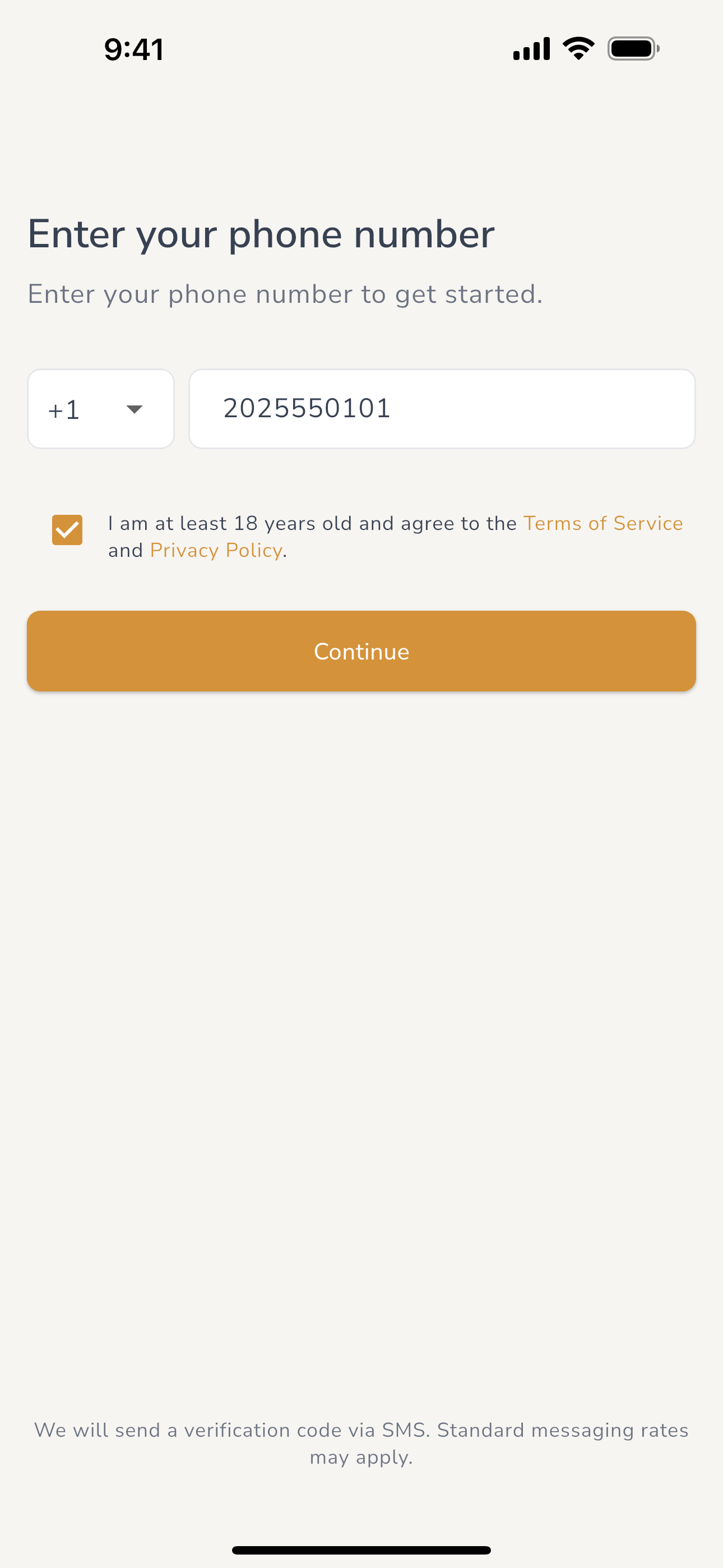
Checkbox 1 — SMS consent:
"I agree to receive transactional SMS notifications from Kautio
related to safety check-ins. Message frequency varies. Msg & data
rates may apply. Reply HELP for help, STOP to cancel."
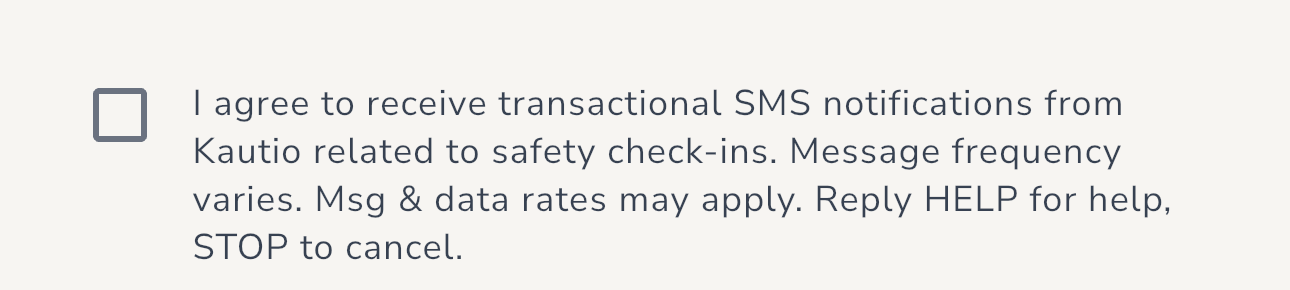
Checkbox 2 — Age and terms:
"I am at least 18 years old and agree to the Terms of Service and
Privacy Policy."
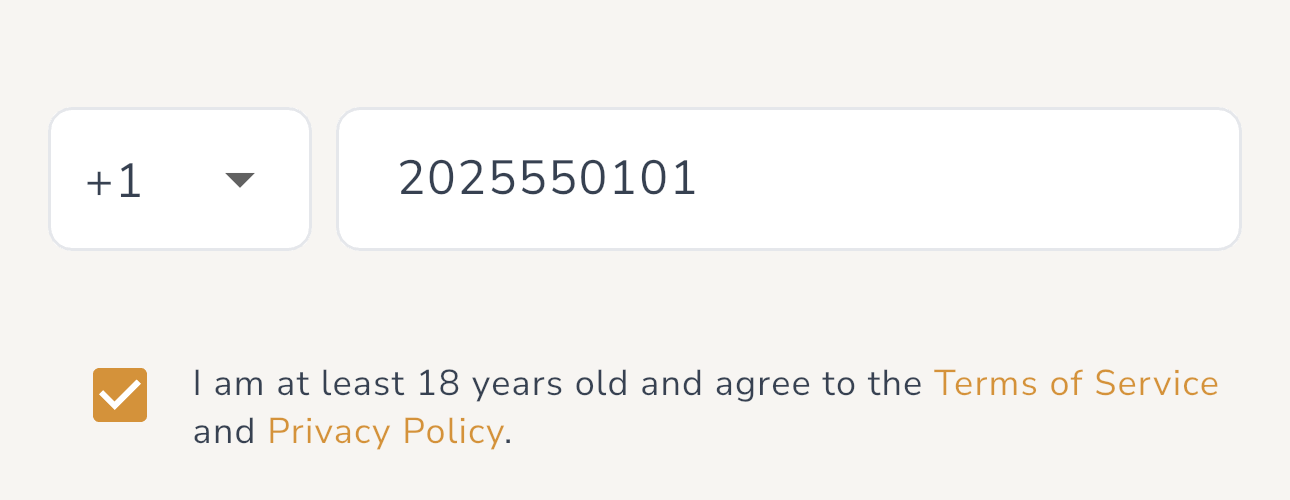
Both checkboxes are unchecked by default and selectable independently. SMS consent is separate from Terms of Service acceptance. The second checkbox links directly to the Terms of Service and Privacy Policy. The account creation flow does not proceed until both checkboxes are ticked. By proceeding, the account holder consents to receive the transactional SMS types listed above for check-ins they themselves schedule.
Path 2 — Invited safety contacts
When an authenticated Kautio account holder adds a phone number as a trusted safety contact, Kautio sends that number a single, one-time invitation SMS identifying the inviter by name and linking to the Kautio app. This invitation is transactional: it is initiated person-to-person by an authenticated, paying account holder who typed the recipient's phone number because they know the recipient personally and want to add them to their own safety plan.
The invitation SMS contains no marketing content. The recipient will
receive no further messages from Kautio unless they install the app and
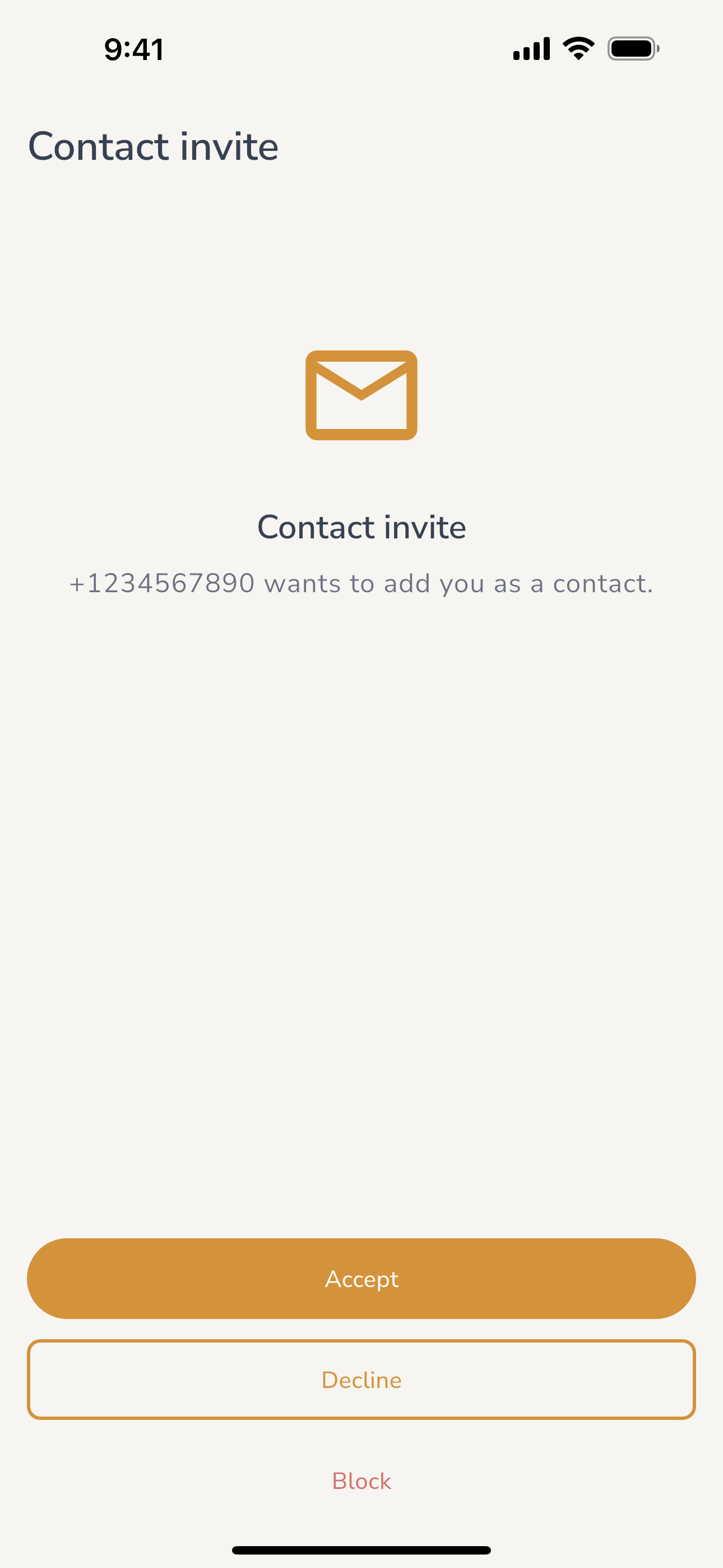
explicitly accept the invitation on the in-app "invite received" screen,
which offers four options: accept, decline,
report the invitation to Kautio, or block the
sender. Declining or blocking stops all further SMS from Kautio
related to that inviter; a report on its own neither accepts nor
declines the invitation. Replying to the
invitation SMS (for example YES) does not accept it —
invitations are accepted only in the app. This two-step design —
a one-time transactional invitation followed by a separate in-app accept
gate — is how Kautio ensures that recurring safety-alert messages only
reach people who have affirmatively chosen to act as a safety contact.
How to opt out
You can stop receiving Kautio SMS at any time. All of the following options work and are honored immediately:
-
Reply
STOPto any Kautio text message. This is handled automatically by our messaging provider (Twilio) and removes your phone number from the Kautio messaging list. You will receive a single confirmation reply and then no further messages.CANCEL,END,QUIT,UNSUBSCRIBE, andSTOPALLare also honored. - Block the sender inside the app. If you received an invitation or alert from a specific Kautio user and you do not want further contact from them, open the Kautio app and use the block option on the invite or contact screen.
- Delete your Kautio account. Account holders can delete their account at any time from inside the app (Settings → Account → Delete account) or at kautio.app/delete-my-account. Deletion removes your profile, contacts, and associated data immediately — encrypted backups expire within 30 days — and ends all SMS from the service. A minimal, content-free audit record of each check-in's schedule and notification outcomes is kept for 7 years after each check-in ends, including past account deletion, for legal-compliance purposes; a hashed, non-reversible identifier derived from the phone number may be retained solely for audit and fraud-prevention purposes, for a limited period.
Opting back in
Replying STOP places a block at the messaging-provider
level: Kautio cannot send you anything at all — safety alerts,
invitations, or any other message — until you lift it. Only you can
lift it, by replying START
(UNSTOP and YES are also honored) to the
same Kautio number.
Replying START restores delivery, but it does not enroll
you in anything by itself:
-
If you want to become someone's safety contact
after opting out, reply
STARTfirst, then ask them to send you a new invitation. While the block is in place Kautio cannot deliver an invitation — or tell either of you why it didn't arrive — so this recovery starts with a conversation between the two of you. Acceptance still happens only in the app. -
If you are already someone's safety contact and
you reply
STOP, their safety alerts cannot reach you until you replySTART. The block stops every message, so Kautio has no way to warn you about a check-in you are missing. If someone is counting on you, tell them you have opted out so they can adjust their safety plan.
Help and support
Reply HELP to any Kautio text message and
you will receive a reply pointing you to support. You can also contact
us directly at any time:
- Email: support@hearthapp.io
- Support page: kautio.app/support
We respond to support requests within 48 hours.
Message and data rates
Message and data rates may apply. Kautio does not charge you to send or receive SMS, but your mobile carrier may charge you for text messages based on your plan. Check with your carrier if you are unsure whether messages are included in your plan.
Privacy and data sharing
Mobile phone numbers and SMS opt-in information collected by Kautio are used exclusively to deliver the safety check-in service described on this page. Kautio does not share, sell, rent, or license mobile opt-in information or phone numbers to third parties or affiliates for marketing or promotional purposes. Phone numbers are shared only with our SMS delivery provider (Twilio) for the sole purpose of sending the messages you have consented to receive. For full details on how Kautio handles data, see our Privacy Policy.
Related policies
Questions about this disclosure
If you are a carrier, a regulator, or a member of The Campaign Registry review team and you need additional information to verify Kautio's messaging program, please contact support@hearthapp.io. We respond to compliance and review inquiries within one business day.